How it works
Shortcut Hunt
A model that scores too well has usually found an easier question than the one you asked. Below are the seven ideas behind the game and its CSV checks, each with the few lines of code that carry it, then the real numbers from running the levels, what the detectors get wrong, and how to reproduce everything.
- Data leakage
- Evaluation
- Logistic regression
- Synthetic data
- Web Workers
One level of the game
- Traina small model learns from the shipped rows, in a Web Worker
- Scoreit is graded on a random held-out set, and looks great
- Guessthe player picks the column or region it is really using
- Removethe shortcut is dropped, masked or split away, and it retrains
- Comparethe honest number, the weights, and a counterfactual
What a shortcut is
Spurious against causal
A feature is causal (or at least stable) when it will still go with the label on the day the model is used. A feature is a shortcut when it goes with the label in this file only: because of how the file was collected, sorted, exported or labelled. A model cannot tell the two apart. It minimises error on the rows it is given, and a shortcut is usually the cheapest way to do that, so it learns the shortcut first and the real signal only if it has to. Geirhos et al. (2020) call this shortcut learning; the pneumonia model that read a hospital's metal token and the husky detector that detected snow are the famous cases.
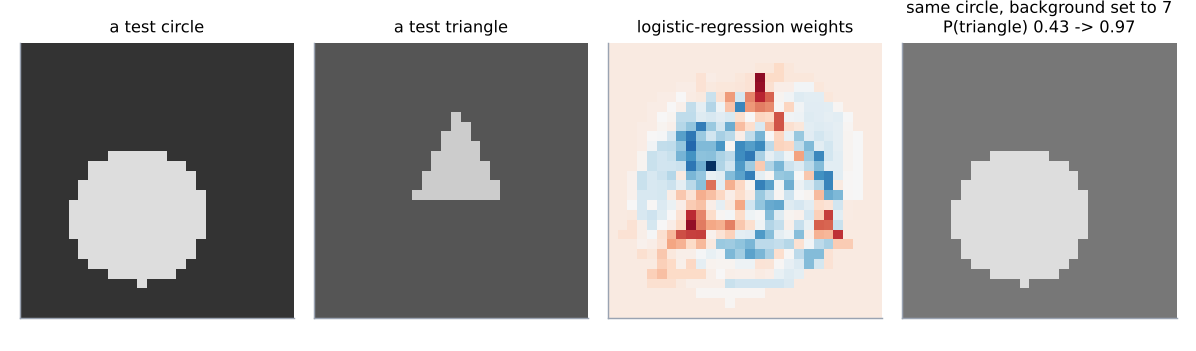
Every level plants one shortcut in a synthetic dataset with a fixed seed. Level 5 is the picture version: circles sit mostly on dark backgrounds and triangles on light ones, with 5% of images flipped so the rule is not perfect. The fix is not to drop anything but to deal the same backgrounds out at random, so the background still varies and still says nothing.
    def draw(k):
        out = []
        for i in range(k):
            y = i % 2
            flip = rng.random() < 0.05
            dark = (y == 0) != flip
            bg = int(rng.integers(0, 4)) if dark else int(rng.integers(5, 9))
            fg = int(rng.integers(12, 16))
            out.append(_shape_record(rng, "triangle" if y else "circle", fg, bg, y, mark=False, radius=(3.5, 8.5)))
        idx = rng.permutation(k)
        recs = [out[i] for i in idx]
        # the fix: the same backgrounds, dealt out at random so they say nothing about the class
fixed = [int(b) for b in rng.permutation([r["bg"] for r in recs])]- The planted correlation: class decides whether the background is dark (0–3) or light (5–8), with 5% exceptions. The shape itself is drawn with a different size and position every time, so it is the harder thing to learn.
- The shuffled backgrounds ship inside the level file. Replacing
bgwithbg_fixedkeeps every pixel statistic the same and removes only the correlation.
A pixel-by-pixel logistic regression gets 96.7% on new images with the correlation in place and 68.3% with the backgrounds shuffled. The second number is what the model knows about shapes.
The ways a label leaks
Six shortcuts, one each per level, plus two cousins
| level | kind | how it got in | the fix |
|---|---|---|---|
| 1 | Row order in an ID | IDs assigned after the file was sorted or batched by outcome | drop the column |
| 2 | Target leakage | a column written after, or computed from, the outcome | drop the column; audit when each column is filled in |
| 3 | Train/test contamination | near-duplicate rows on both sides of a random split | dedupe, or split by the entity that repeats |
| 4 | Collection artefact | one class carries a watermark, stamp or scanner signature | mask it; collect both classes the same way |
| 5 | Context correlation | background or setting differs by class | balance the contexts, or augment |
| 6 | Temporal leakage | a random split lets the model learn each period's label rate | split on time |
| 7 | Label in free text | a note typed after the outcome contains the outcome | drop text written after the event |
| 8 | Not a leak: a bad yardstick | 95% of rows are one class, so accuracy flatters a do-nothing model | balanced accuracy, recall, a baseline |
Kaufman, Rosset and Perlich (2012) give the general definition: leakage is any information in the training data that will not legitimately be available at prediction time. Level 1 is the version people find hardest to believe, so here is exactly how the IDs are made. The labels are drawn first, the file is sorted by label, and the IDs are handed out in that order; then the rows are shuffled so nothing looks sorted.
    y = (rng.random(n) < _sigmoid(logit)).astype(int)
    # the leak: ids assigned in label order (all the "no" rows first), then the file was shuffled
    order = np.argsort(y, kind="stable")
    ids = np.empty(n, dtype=int)
    ids[order] = 10001 + np.arange(n)
perm = rng.permutation(n)- A stable sort by label: every “repaid” row comes before every “defaulted” row.
- IDs 10001 upward in that order. The first 10,460 or so belong to repaid loans, the rest to defaults; the one-rule model finds the boundary exactly.
Level 2 is target leakage. A cancellation fee is charged to 93% of the customers who cancel and to almost nobody else, which is realistic: it is a consequence of the outcome, so it is a near-perfect predictor and completely useless in production, where you would be predicting for customers who have not cancelled yet.
    y = (rng.random(n) < _sigmoid(logit)).astype(int)
    cancel_fee = np.zeros(n)
    churned = y == 1
    charged = churned & (rng.random(n) < 0.93)
    cancel_fee[charged] = np.round(fee[charged] * rng.uniform(1.0, 2.0, charged.sum()), 2)
    odd = (~churned) & (rng.random(n) < 0.03)          # a few plan-change fees on stayers
cancel_fee[odd] = np.round(rng.uniform(5, 20, odd.sum()), 2)- The fee exists only because the churn happened. Any column with this shape (a refund, a final bill, a closing status, a
days_until_…) is a leak however innocent its name. - A few stayers pay a plan-change fee, so the column is not a perfect flag; the model still gives it a standardized weight of 4.1 against 0.6 for the next column.
Why the held-out set does not catch it
The test rows have the shortcut too
The usual defence against overfitting is a random held-out set: train on 70% of the rows, score on the other 30%. That defence assumes the held-out rows are a fair sample of the rows the model will meet later. A shortcut breaks that assumption without breaking the split: the leaked column, the ID order, the watermark are in the test rows just as they are in the training rows, so a model that uses them scores well on both. The score is real; it just measures the wrong thing.
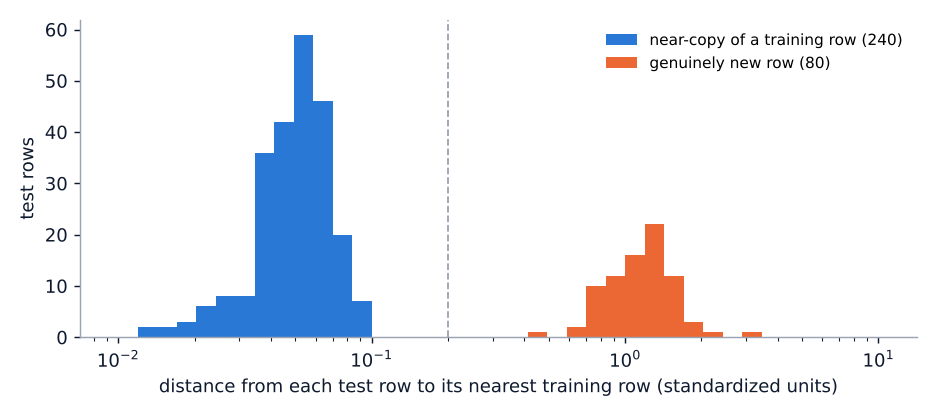
Level 3 is the extreme case. 240 of the 320 test rows are near-copies of training rows (each feature nudged by 2% of its standard deviation, which is what a re-export with different rounding, or a join that fans out, produces). Nearest-neighbour matching is right on all 240 of them, because it has literally seen them, and on 64% of the 80 genuinely new rows.
        return X, y

    Xtr, ytr = draw(ntr)
    src = rng.integers(0, ntr, ndup)
    Xdup = Xtr[src] + rng.normal(0, 1, (ndup, 6)) * sd * 0.02
    ydup = ytr[src]
    Xf, yf = draw(nfresh)
Xte = np.vstack([Xdup, Xf])- A random training row plus a little noise. The noise is small enough that the copy is still its own nearest neighbour in standardized space, at a distance of about 0.05, while fresh rows sit about 1.0 from anything.
The game's fix does the honest thing in the browser rather than shipping a second test file: it measures the distance from every test row to the nearest training row and keeps only the rows that are not within 0.2.
    if fix["type"] == "drop":
        keep = [j for j, f in enumerate(feats) if f not in fix["columns"]]
    elif fix["type"] == "drop_prefix":
        keep = [j for j, f in enumerate(feats) if not f.startswith(fix["prefix"])]
    elif fix["type"] == "dedupe":
        _, dist = knn1(Xtr, ytr, Xte)
        fresh = dist > fix["eps"]
        out.update({"Xte": Xte[fresh], "yte": yte[fresh], "kept": fresh})
        return out
    else:  # metric: same data, different yardstick
return out- The same 1-NN call that makes the prediction also returns the distance to the row it matched. A gap of 0.2 separates the two groups by a factor of ten on either side (see the histogram in Results).
- The honest accuracy is scored on 80 rows, so it is noisier than the others; the game says how many rows are left.
A held-out set only measures generalisation to rows drawn the same way. If the shortcut is part of “the same way”, it generalises fine. You need either a held-out set from the deployment distribution, or an argument that each column is legitimately available at prediction time.
One column at a time: AUC as a detector
The cheapest leak check there is
A leaked column predicts the label on its own, with no model. The area under the ROC curve (AUC) of a single column against a binary label measures exactly that: the probability that a random positive row has a higher value than a random negative one. 0.5 is a coin flip, 1.0 is a perfect ordering, and nothing has to be fitted, so there is nothing to overfit. The rank formula is a few lines, and ties get average ranks so a column that is mostly zeros (like the cancellation fee) is scored fairly.
def auc(scores, labels) -> float:
    """Area under the ROC curve by the rank statistic, with average ranks for ties."""
    s = np.asarray(scores, dtype=float)
    yb = np.asarray(labels, dtype=int)
    n1 = int(yb.sum())
    n0 = len(yb) - n1
    if n1 == 0 or n0 == 0:
        return 0.5
    order = np.argsort(s, kind="stable")
    ranks = np.empty(len(s))
    i = 0
    while i < len(s):
        j = i
        while j + 1 < len(s) and s[order[j + 1]] == s[order[i]]:
            j += 1
        ranks[order[i:j + 1]] = 0.5 * (i + j) + 1.0   # average 1-based rank
        i = j + 1
return float((ranks[yb == 1].sum() - n1 * (n1 + 1) / 2.0) / (n1 * n0))- Sort once, then walk the sorted values assigning each run of equal values its average rank. This is the Mann–Whitney statistic, which equals the AUC.
- Sum of the positives' ranks, minus what they would sum to if they were all at the bottom, divided by the number of positive–negative pairs.
The CSV tool scores every numeric column this way, and every category column with up to 50 levels by replacing each level with the label rate of that level on the other half of the rows (two folds, so a category that is unique to one row does not score itself). The flag is AUC ≥ 0.95, with 0.90–0.95 as “worth a look”. That threshold has false positives, and the tool says so.
            score = fill_mean(p["values"])
        else:
            if p["unique"] > 50 or p["unique"] < 2:
                continue
            score = np.zeros(n)
            for f in (0, 1):
                rate, cnt = {}, {}
                for i in range(n):
                    if fold[i] != f:
                        v = p["values"][i]
                        rate[v] = rate.get(v, 0) + int(y[i])
                        cnt[v] = cnt.get(v, 0) + 1
                base = float(y[fold != f].mean())
                for i in range(n):
                    if fold[i] == f:
                        v = p["values"][i]
                        score[i] = rate[v] / cnt[v] if cnt.get(v) else base
        a = auc(score, y)
        strengths.append({"column": p["name"], "auc": max(a, 1 - a), "direction": "higher" if a >= 0.5 else "lower", "type": p["type"]})
    strengths.sort(key=lambda s: (-s["auc"], s["column"]))
    flagged = [s for s in strengths if s["auc"] >= 0.9]
    crowd = len(flagged) >= 4
    for s in flagged:
sev = "medium" if crowd else "high" if s["auc"] >= 0.95 else "medium"- Target-rate encoding of a category, fitted on one fold and applied to the other, so the AUC is out-of-sample for categories.
- When four or more columns are above 0.9, every one of them is downgraded to “medium” and the message changes: that is the pattern of an easy problem, not of one leaked column. On the breast-cancer data eleven honest columns score above 0.9, three of them above 0.95.
Whether the column is legitimately known at prediction time. “Worst concave points” in a biopsy is honestly 0.97 AUC for malignancy; “refund amount” in a churn file is 0.98 because it was written after the customer left. The number is the same. The question the tool asks after it, when does this value get written down?, is the actual check.
Saliency from linear weights
What a pixel model is looking at, and a counterfactual to prove it
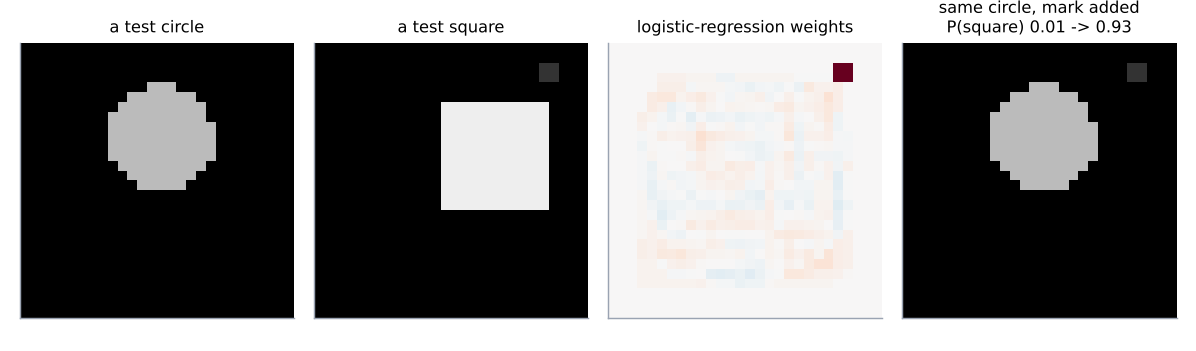
The two picture levels use logistic regression on the 784 raw pixels, standardized. For a linear model the “where is it looking” question has an exact answer: the weight of each pixel. Reshape the 784 weights into 28 × 28 and you have a saliency map with no approximation in it: red pixels push towards one class, blue towards the other, and the magnitude says how hard. In level 4 one 2 × 2 block in the top-right corner has a weight of 0.88 and nothing in the shapes comes close.
A heat map can still be argued with, so each picture level also shows a counterfactual: one real test image of each class, with only the shortcut changed, and the model's probability before and after. The shape is untouched. A circle with the mark added becomes a “square” with probability 0.93; a square with the mark removed drops from 0.70 to 0.00.
def counterfactuals(level: dict, w, b) -> list:
    """For the picture levels: take one test image of each class, change only the shortcut,
    and see what the shortcut-trained model says."""
    data = materialize(level, False)
    model = logreg_fit(data["Xtr"], data["ytr"])
    recs = level["test"]
    out = []
    for cls in (0, 1):
        i = next(k for k, r in enumerate(recs) if r["y"] == cls)
        r = recs[i]
        if level["fix"]["type"] == "mask_mark":
            a = im.compose_record(r)
            bimg = im.compose_record(r, mark_override=0 if r["mk"] else 1)
            change = "mark removed" if r["mk"] else "mark added"
        else:
            a = im.compose_record(r)
            other = 7 if r["bg"] <= 3 else 1
            bimg = im.compose_record(r, bg_override=other)
            change = "background set to %d" % other
        pa, pb = logreg_scores(model, a[None])[0], logreg_scores(model, bimg[None])[0]
        out.append({"index": i, "y": cls, "change": change, "p_before": float(pa), "p_after": float(pb)})
return out- The model that was trained with the shortcut in place is asked about the same image twice: as it is, and with the mark toggled.
compose_recordrebuilds the pixels from the shipped mask, so the edit is exact. - Two probabilities from the same weights. The gap between them is the shortcut's share of the decision.
For deeper models the same idea needs an approximation (gradients, integrated gradients, occlusion), and the counterfactual becomes the more trustworthy half of the pair. Masking the mark and retraining then gives the honest accuracy: 61.7% for circles against squares, which is about what a linear model on raw pixels can do with shapes that move around.
Split the way the world splits
Time splits and grouped splits
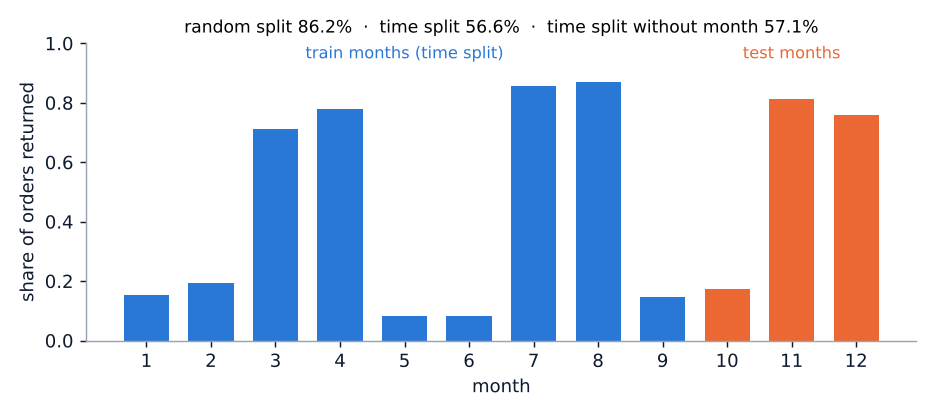
If your rows have a clock, the model will be used on rows from a later time than any it was trained on. A random split hides that: training and test rows come from the same months, so a model that learns what each month looked like is rewarded. Level 6 makes the month a category (one column per month, which is common practice) and the return rate jump from 10% to 85% and back as promotions come and go. With a random split the model scores 86.2%. Trained on months 1–9 and tested on 10–12 it scores 56.6%, and 57.1% with the month columns removed altogether: on months it has never seen, the month columns are constant in training and carry no weight, so the calendar was the whole model.
    if fix["type"] == "time_split":
        X = np.array(level["all"]["X"], dtype=float)
        y = np.array(level["all"]["y"])
        if fixed:
            t = X[:, feats.index(fix["time_feature"])]
            tr, te = t <= level["time_cutoff"], t > level["time_cutoff"]
        else:
            tr, te = np.array(level["random_train"]), np.array(level["random_test"])
        if drop_time:
            keep = [j for j, f in enumerate(feats) if f != fix["time_feature"]]
            X = X[:, keep]
            feats = [feats[j] for j in keep]
        X, feats = expand(X, feats, level.get("categorical", {}))
return {"Xtr": X[tr], "ytr": y[tr], "Xte": X[te], "yte": y[te], "features": feats}- The honest split is a threshold on the time column, not a shuffle. The cutoff ships with the level.
- One-hot columns are built from the categories in the whole file, so a month that is missing from training is an all-zero column there, with zero standard deviation and therefore zero weight.
The same rule gives grouped splits: if a customer, patient or device appears in several rows, all of their rows go on the same side, which is what level 3's deduplication approximates. The CSV tool's timestamp check runs the comparison for you: a logistic regression on the numeric columns, scored once on a random split and once on the past-versus-future split, plus the label rate in five consecutive periods.
            idx = order[k * n // bins:(k + 1) * n // bins]
            rates.append(float(y[idx].mean()))
        ntr = int(0.7 * n)
        shuf = rng.shuffle(list(range(n)))
        rtr, rte = np.array(sorted(shuf[:ntr])), np.array(sorted(shuf[ntr:]))
        ttr, tte = order[:ntr], order[ntr:]
        acc_random = accuracy(logreg_predict(logreg_fit(X[rtr], y[rtr]), X[rte]), y[rte])
        acc_time = accuracy(logreg_predict(logreg_fit(X[ttr], y[ttr]), X[tte]), y[tte])
        drift = max(rates) - min(rates)
        drop = acc_random - acc_time
        pbar = float(y.mean())
        se = math.sqrt(pbar * (1 - pbar) / (n // bins))           # a five-way split of a small file wobbles by chance
real = drift >= 4 * se- Same features, same model, two splits. The difference is the price of the calendar.
- Five bins of a small file wobble by chance, so the drift has to be at least four standard errors of a bin's rate before it counts; without this, a 120-row file was flagged for drift that was pure noise.
The same numbers in your browser
A deterministic port, checked column for column
Everything on the project page runs in the visitor's browser: the eight levels train in a Web Worker from JSON files that are 13–36 KB each, and the CSV never leaves the machine. web/models.js, web/engine.js and web/checks.js are line-for-line ports of hunt/. Unlike Bandits Lab, nothing here is Monte Carlo, so the two implementations can be held to exact agreement: the datasets ship ready-made, and the models use no random numbers at all. Logistic regression is full-batch gradient descent from zero weights with a fixed number of steps, and the step size is computed, not tuned, so that the same 500 steps are stable for 5 columns and for 784 pixels.
def lipschitz(Z: np.ndarray, l2: float, iters: int = 60) -> float:
    """Largest eigenvalue of Z'Z/n by power iteration, then L = lambda/4 + l2
    (the Lipschitz constant of the logistic-loss gradient). Fixed start, fixed iterations."""
    n, d = Z.shape
    v = np.ones(d) / np.sqrt(d)
    lam = 0.0
    for _ in range(iters):
        u = Z @ v
        w = Z.T @ u
        norm = float(np.sqrt(np.dot(w, w)))
        if norm < 1e-300:
            return l2
        v = w / norm
        lam = norm / n
return lam / 4.0 + l2- Power iteration from a fixed start vector finds the largest eigenvalue of the standardized design matrix. Sixty iterations, always, so Python and JavaScript do the same arithmetic.
- The logistic loss has a gradient that is Lipschitz with constant λmax/4 + ℓ2, so a step of 1/L never diverges, whatever the data.
def logreg_fit(X, y, iters: int = 500, l2: float = 1e-3) -> dict:
    """Logistic regression by full-batch gradient descent with step 1/L, zero start.
    Returns standardized-space weights (what the charts show) plus the mean/scale to apply."""
    X = np.asarray(X, dtype=float)
    y = np.asarray(y, dtype=float)
    mean, inv = standardize_fit(X)
    Z = standardize(X, mean, inv)
    n, d = Z.shape
    L = lipschitz(Z, l2)
    lr = min(10.0, 1.0 / L)
    w = np.zeros(d)
    b = 0.0
    for _ in range(iters):
        p = sigmoid(Z @ w + b)
        g = p - y
        w = w - lr * (Z.T @ g / n + l2 * w)
        b = b - lr * float(g.mean())
return {"w": w, "b": b, "mean": mean, "inv": inv, "lr": lr, "iters": iters, "l2": l2}- Step 1/L, capped at 10 for a degenerate all-constant matrix.
- The whole optimiser. No shuffling, no early stopping, no line search: nothing that could make two runs differ.
  function logregFit(X, y, iters, l2) {
    iters = iters || 500; l2 = l2 == null ? 1e-3 : l2;
    var st = standardizeFit(X), Z = standardize(X, st), n = Z.n, d = Z.d;
    var L = lipschitz(Z, l2), lr = Math.min(10, 1 / L);
    var w = new Float64Array(d), b = 0, g = new Float64Array(n), gw = new Float64Array(d), i, j;
    for (var it = 0; it < iters; it++) {
      var gb = 0;
      for (i = 0; i < n; i++) {
        var s = b; for (j = 0; j < d; j++) s += Z.a[i * d + j] * w[j];
        g[i] = sigmoid(s) - y[i]; gb += g[i];
      }
      for (j = 0; j < d; j++) gw[j] = 0;
      for (i = 0; i < n; i++) { var gi = g[i]; for (j = 0; j < d; j++) gw[j] += Z.a[i * d + j] * gi; }
      for (j = 0; j < d; j++) w[j] = w[j] - lr * (gw[j] / n + l2 * w[j]);
      b = b - lr * (gb / n);
    }
return { w: w, b: b, mean: st.mean, inv: st.inv, lr: lr, iters: iters, l2: l2 };- The same constant, from the same power iteration, in JavaScript.
- numpy's
Z.T @ gbecomes two nested loops over a flatFloat64Array. The sums run in a different order, so the weights differ at the 10−15 level; the parity test allows 10−6 and the accuracies match to every digit.
The only random numbers anywhere are in the CSV tool's 70/30 split, where both sides use mulberry32, a 32-bit generator small enough to port exactly, so the split, the folds and every reported number are identical. The parity test runs all eight levels and six CSV files through both engines and compares every accuracy, weight, check id, severity and sentence of explanation.
  function knn1(Xtr, ytr, Xte) {
    var st = standardizeFit(Xtr), A = standardize(Xtr, st), B = standardize(Xte, st), d = A.d;
    var pred = new Array(B.n), dist = new Float64Array(B.n);
    for (var i = 0; i < B.n; i++) {
      var best = Infinity, bj = 0;
      for (var k = 0; k < A.n; k++) {
        var s = 0;
        for (var j = 0; j < d; j++) { var t = A.a[k * d + j] - B.a[i * d + j]; s += t * t; }
        if (s < best) { best = s; bj = k; }
      }
      pred[i] = ytr[bj]; dist[i] = Math.sqrt(best);
    }
    return { pred: pred, dist: dist };
  }

// ------------------------------------------------------------- stump --- Nearest neighbour with strict
<, so a tie goes to the lowest training index, asnp.argmindoes. The distance to the match is kept for the deduplication step and the histogram.
Results
What the Python run found
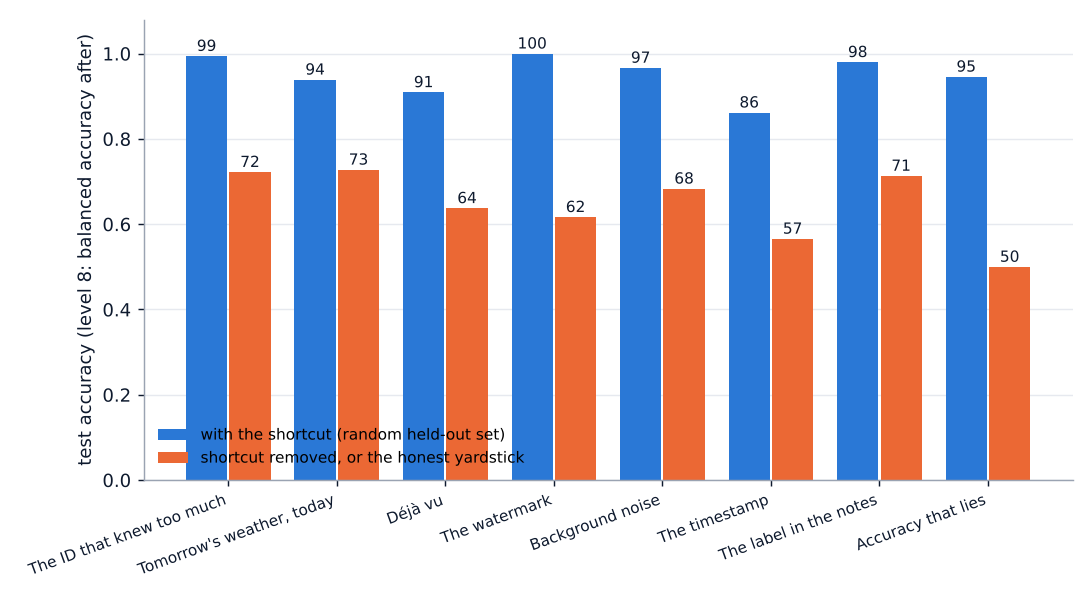
Every number below comes from python experiments/run_levels.py and is reproduced to the digit by the page. “With shortcut” is accuracy on the level's random held-out set; “without” is the same model after the fix. The honest numbers are low on purpose: the synthetic signals are weak, so that the collapse is unmistakable.
| level | model | with shortcut | without | held-out rows | note |
|---|---|---|---|---|---|
| 1 The ID that knew too much | decision stump | 99.4% | 72.2% | 180 | rule found: id > 10460; the best honest column is late_payments |
| 2 Tomorrow's weather, today | logistic regression | 93.9% | 72.8% | 180 | cancel_fee weight 4.11; next largest 0.61 |
| 3 Déjà vu | 1-nearest neighbour | 90.9% | 63.7% | 320 → 80 | 100% on the 240 near-copies, 63.7% on the 80 new rows |
| 4 The watermark | pixel logistic regression | 100.0% | 61.7% | 60 | mark added to a circle: P(square) 0.01 → 0.93 |
| 5 Background noise | pixel logistic regression | 96.7% | 68.3% | 60 | circle on a light background: P(triangle) 0.43 → 0.97 |
| 6 The timestamp | logistic regression, month one-hot | 86.2% | 56.6% | 216 → 205 | time split; 57.1% with the month columns dropped |
| 7 The label in the notes | logistic regression, bag of words | 98.0% | 71.3% | 150 | “escalated” weight 3.86; next largest 1.07 |
| 8 Accuracy that lies | logistic regression | 94.6% | 50.0% | 240 | balanced accuracy; recall 0%; always-“fine” scores 94.6%; AUC 0.86 |
The CSV checks on clean data
To see which detectors cry wolf, the same checks were run on three datasets that ship with scikit-learn and have no leakage in them, and on the demo file, which has four planted problems. For the three-class datasets the biggest class is tested against the rest.
| file | rows | what fired | verdict |
|---|---|---|---|
| demo.csv | 600 | ID order (high, AUC 0.90), refund_amount (high, AUC 0.98), calendar (high, 29% → 83% by period), déjà vu (medium: 12.8% of test rows are exact copies, 1-NN 100% on them against 90% on the rest) | all four planted problems found |
| breast cancer | 569 | 11 columns with AUC above 0.9, three above 0.95 (worst perimeter 0.975) | false positives, downgraded to medium by the “crowd” rule |
| iris (setosa vs rest) | 150 | petal length AUC 1.000, petal width 1.000, sepal length 0.96: three “high” flags | false positives; setosa really is that separable |
| wine (class_1 vs rest) | 178 | color_intensity 0.960 (high), alcohol (medium) | false positive |
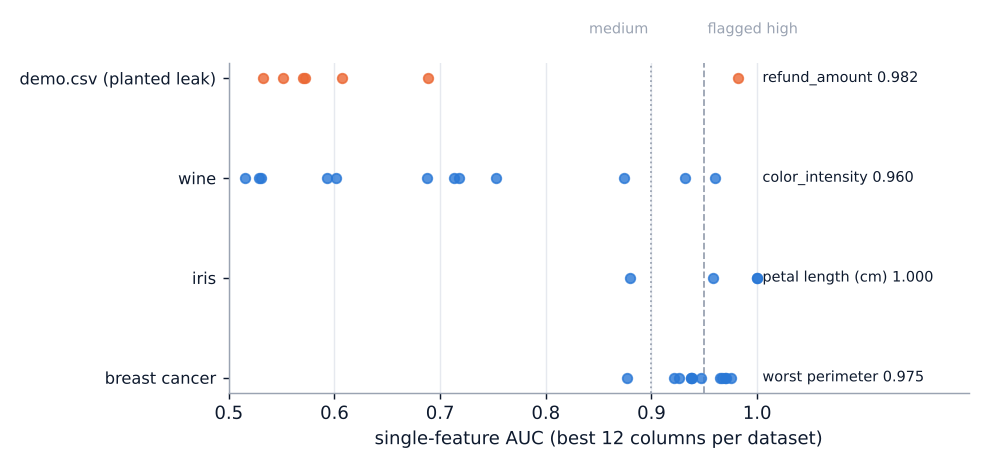
The ID hunt, déjà vu hunt and timestamp hunt stayed quiet on all three clean files once two rules were added: an ID must be a whole number or a string (a measurement with decimals is never an ID, even if every value is distinct), and near-copies only count when there are at least three numeric columns (with two, honest rows sit close together all the time). Before those rules, “mean concave points” was an ID and a 120-row file with two numeric columns was 100% duplicates.
Browser against Python
python tests/parity.py runs the eight levels and six CSV cases through both engines: every accuracy, confusion count, stump threshold, nearest-neighbour distance and check sentence is identical, and the largest difference in any logistic-regression weight is below 10−9. In the browser the two picture levels take about 0.5 s each to train twice (784 weights, 500 steps, power iteration); the tabular levels take under 50 ms.
Limits
What the game and the checks do not do
- The leak hunt has false positives by design. AUC ≥ 0.95 flags honest columns in easy datasets (iris, wine, breast cancer above). The crowd rule catches some of that; a single genuinely strong column still gets flagged. The flag is a question, not a verdict.
- Order in an ID is not always a leak. IDs that track the label can also mean the data came from two sources with different base rates. That is still worth knowing, and the column should still be dropped, but the fix may be a grouped split rather than a deletion.
- Duplicates are not always contamination. Low-cardinality data has honest exact duplicates (two patients with the same four readings). The check reports how much better the model does on copies than on fresh rows, which is the part that matters.
- Drift is not leakage. A worse time-split score can mean the world changed, not that the model cheated. The time-split number is still the honest one to report.
- Level 8 is a metric problem, not a leak, and is in the game because it produces the same symptom: a number that looks great and means nothing.
- The datasets are synthetic and the honest signals are deliberately weak, so the honest accuracies (56–73%) say nothing about real churn, loans or wine. They are there to make the collapse visible.
- The models are tiny. Logistic regression, 1-NN and a stump; linear saliency is exact only for the linear model. Real projects need the same questions asked of bigger models, where the answers are approximate.
- The CSV checks need a two-class target (or they test the biggest class against the rest), numeric or low-cardinality columns, and at most 3,000 rows (more are subsampled). Regression targets and free text are not handled; for missing values, formats and conflicting labels use Dataset Doctor, which overlaps with this tool on single-feature strength and duplicates but asks different questions of the rest of the file.
- Facilitator mode trusts the host: it records whichever suspect is selected when Reveal is pressed.
Reproduce
Every number and figure
pip install -r requirements.txt        # numpy, scikit-learn (for the clean datasets), matplotlib, pytest
python data/make_levels.py             # web/levels/*.json, byte-identical every time
python data/make_demo_csv.py           # web/demo.csv
python experiments/run_levels.py       # the table above and out/*.png, about 5 s
python -m pytest -q                    # 22 tests, about 3 s
python tests/parity.py                 # needs node; 8 levels + 6 CSV files through both engines
Runtimes are on a 2-CPU machine. The page needs a static web server (python3 -m http.server from the site root) because Web Workers and fetch do not run from file://. Add ?host to the URL for facilitator mode.
References
Where the ideas come from
- Kaufman, Rosset & Perlich (2012). Leakage in data mining: formulation, detection, and avoidance. ACM TKDD.
- Geirhos, Jacobsen, Michaelis, Zemel, Brendel, Bethge & Wichmann (2020). Shortcut learning in deep neural networks. Nature Machine Intelligence.
- Zech, Badgeley, Liu, Costa, Titano & Oermann (2018). Variable generalization performance of a deep learning model to detect pneumonia in chest radiographs. PLOS Medicine.
- Ribeiro, Singh & Guestrin (2016). “Why should I trust you?” Explaining the predictions of any classifier. KDD (the husky–wolf example).
- Kapoor & Narayanan (2023). Leakage and the reproducibility crisis in machine-learning-based science. Patterns.
- Hanley & McNeil (1982). The meaning and use of the area under a ROC curve. Radiology; Mann & Whitney (1947) for the rank statistic.
- Simonyan, Vedaldi & Zisserman (2014). Deep inside convolutional networks: visualising image classification models and saliency maps. ICLR workshop.
- Bergmeir & Benítez (2012). On the use of cross-validation for time series predictor evaluation. Information Sciences.
- For the browser port: Nesterov (2004) for the 1/L step of gradient descent on an L-smooth convex function; Tommy Ettinger's mulberry32 generator.
Read further
Where everything lives
- hunt/models.py logistic regression, 1-NN, decision stump, AUC and the other metrics
- hunt/levels.py the eight generators, materialize (before/after), run_level, counterfactuals
- hunt/images.py shape masks, the packed image format, compose
- hunt/checks.py the CSV checks and a small CSV reader
- hunt/rng.py mulberry32, shared with the JavaScript bit for bit
- data/make_levels.py writes web/levels/*.json
- data/make_demo_csv.py writes web/demo.csv with four planted shortcuts
- experiments/run_levels.py the results table, the figures, the false-positive study
- tests/parity.py Python against JavaScript on every level and CSV case
- tests/test_models.py AUC against scikit-learn, optimiser stability, stump and 1-NN ties
- tests/test_levels.py every level collapses without its shortcut; shipped files match the generator
- tests/test_checks.py the planted demo problems are found; clean data passes
- web/models.js browser port of models.py, images.py and rng.py
- web/engine.js browser port of the level logic
- web/checks.js browser port of the CSV checks
- web/worker.js runs training and the checks off the main thread
- web/page.js the game, its charts and the CSV tool
- README.md how to run and check it